Updates 02/13/2025
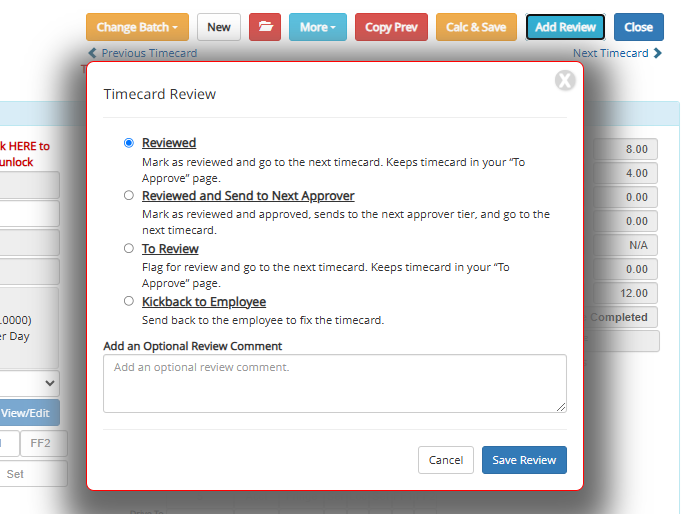
We’re introducing a new timecard review feature to help approvers efficiently manage and organize their approval process. This update allows approvers to tag timecards with review status, add notes, and easily sort dashboards based on review progress.
- Approvers can now tag timecards as "Reviewed" and add optional notes to better organize timecards that are ready for approval.
- A new dashboard filter allows approvers to quickly find reviewed timecards. Hovering over a timecard will display its review notes for easy review.
- Approvers can kick back, approve, send to the next tier, or flag timecards for later review within the Timecard Review functions.
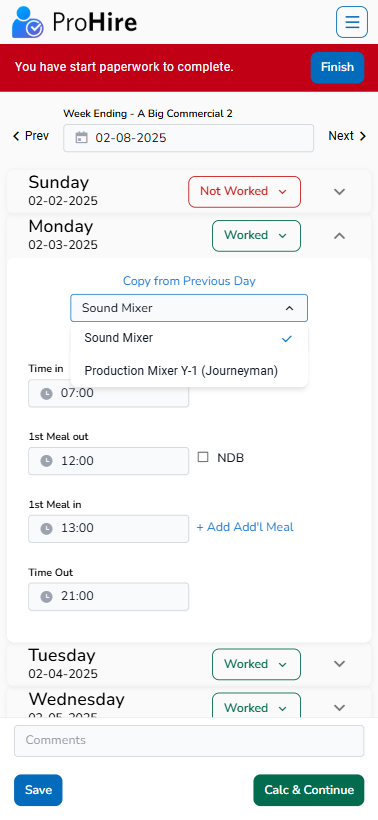
The mobile timecard has been enhanced with several key improvements for better functionality and usability, including support for multiple jobs, streamlined document uploads, and easy access to the summary calculations.
- Employees with more than one job can now easily track their time by selecting the appropriate job from a dropdown menu. (This option will only display if the employee has more than one job set up.)
- A dedicated section for uploading and managing timecard-related documents has been added for improved accessibility.
- The timecard status is now displayed at the bottom of the mobile entry screen for easy review.
- Signed and submitted (locked) timecards now allow users to view the timecard calculation summary.
- The calculation summary now dynamically displays all applicable pay categories, replacing the previous fixed set of fields.
- A reminder is now shown when signing and submitting a timecard indicating that it will be locked for further editing.
- Improvements to the "Other Pay" logic addresses blank entries, and additional validation has been added for accuracy.